
Java Edition Litematic · PNG / PDF / CSV free · .litematic after free sign-in
Convert an image directly to a Litematic
BlockArtLab turns PNG, JPG or WebP pixels into real Minecraft block coordinates, then exports a .litematic, a gridded PNG blueprint and an exact material CSV.
Export rules (read once)
- Your conversion: Preview conversion stays free and private in your browser. Download a gridded PNG blueprint, printable PDF, and materials CSV with no account. Sign in free only when you want an optional Java Edition .litematic for compatible Litematica tooling.
- Sample files on this page only: the sunset-mountain verification downloads below are public. They do not require an account or credits.
- Bedrock / console: Bedrock, console, and unmodded Java should use PNG + CSV for manual builds. .litematic targets Java Edition + Litematica.
Written and technically reviewed by BlockArtLab · Updated October 29, 2026

Public sample files (no account) — verify before converting your own image
The three downloads below are fixed verification samples, not your personal exports. They come from the same BlockArtLab conversion code used by the browser tool: a sunset mountain graphic at 32×32 with the survival-friendly palette and vertical wall orientation. These public samples need no BlockArtLab account and no credits.
These samples do not replace converting your own image. When you convert your own file in the tool: PNG, printable PDF, and CSV are free without an account; only .litematic needs free sign-in.
Reproducible check (creative test world): download the sample .litematic, place it in your schematics folder, load it with a matching Litematica + MaLiLib build for your Minecraft version, then confirm origin, rotation, and that the 32×32 silhouette matches the preview PNG. Mod versions vary by install—always verify locally before pasting into a valued survival world.
Public sample · no account
Litematic file32 × 32 vertical Java Edition structure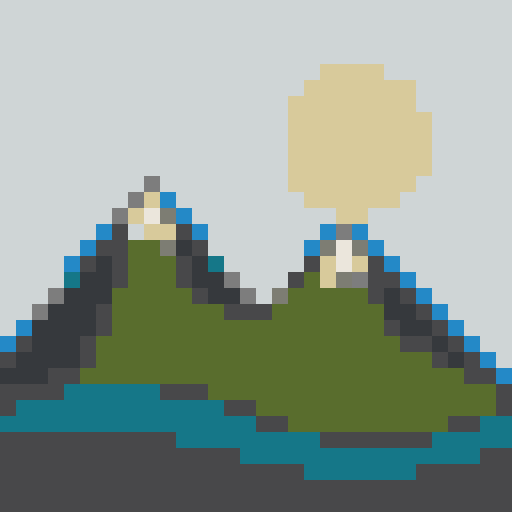
Public sample · no account
Blueprint PNGGridded manual-building referencePublic sample · no account
Material CSVExact quantities for 10 block typesHow does an image become a Litematic?
A usable result needs more than a pixel filter. BlockArtLab first resizes the source to the chosen physical block dimensions, matches every cell to a real block palette, assigns X/Y coordinates for wall art or X/Z coordinates for flat art, and writes the resulting block states into the Litematic structure.
What steps should you follow?
- Prepare a clear source image. Crop around one recognizable subject. PNG, JPG and WebP work; high contrast and a simple background survive small block grids best.
- Choose the real build dimensions. Start at 32 or 64 blocks wide. The selected pixel grid becomes the physical width and height of the Minecraft structure.
- Select wall or flat geometry. Wall mode writes blocks on the X/Y plane. Map mode writes a one-block-high layout on the X/Z plane.
- Check blocks and materials. Inspect the block preview and exact material totals before exporting. Change the palette if the colors or survival cost are unsuitable.
- Export and load the Litematic. Sign in with a free account to download your .litematic, place it in the schematics folder for the matching Minecraft instance, and load it with a compatible Litematica and MaLiLib setup. Test in a creative copy first.
Which files should you keep?
| File | Best use | Compatibility | Limitation |
|---|---|---|---|
| .litematic | In-game placement reference | Compatible Java Edition setup | Not a Bedrock import format |
| Blueprint PNG | Manual row-by-row building | Java, Bedrock, mobile, console | Does not place blocks automatically |
| Material CSV | Resource and stack planning | Any spreadsheet | Check version-specific substitutions |
What should you check inside Minecraft?
Verify Minecraft, Litematica and MaLiLib compatibility before relying on any downloaded schematic. Confirm the placement origin, rotation and front-facing direction in a creative test world. The maintainer’s official Litematica repository and official wiki are the authoritative sources for current installation and controls.
What problem are Minecraft builders actually asking about?
Builders repeatedly ask for a picture-to-Minecraft converter that creates a Litematic directly instead of stopping at a visual image. A recent r/litematica question about direct picture conversion is an example of that exact workflow gap. BlockArtLab addresses it while retaining PNG and CSV fallbacks for builders who cannot use the Java mod format.
What are the important limitations?
- A larger grid improves detail but multiplies collection and placement work: 32×32 is 1,024 positions; 64×64 is 4,096; 128×128 is 16,384.
- Flat mode creates a one-level X/Z mosaic. It does not automatically create advanced staircase height shading for map colors.
- BlockArtLab creates a placement reference, not an automatic server-side build. Follow the rules of the world or server you use.
What do builders ask about image-to-Litematic conversion?
Can an image be converted directly to a Litematic?
Yes. BlockArtLab maps the image to real Minecraft blocks and writes their coordinates directly into a .litematic. No intermediate world conversion is required. PNG, printable PDF, and CSV are free without an account; only .litematic needs free sign-in.
Do I need an account to export PNG or Litematic?
PNG, printable PDF, and CSV are free without an account; only .litematic needs free sign-in.
Does the Litematic work in Bedrock Edition?
No. Bedrock, console, and unmodded Java should use PNG + CSV for manual builds. .litematic targets Java Edition + Litematica.
Does BlockArtLab automatically place blocks?
No. The Litematic is a client-side placement reference. Server rules and Litematica configuration determine which placement features are allowed.
Are material counts exact for my whole build?
Counts match the converted block grid (each cell → one planned block) and include stack-of-64 estimates. They do not automatically include scaffolding, lighting, borders, or other support materials you add around the art.
Next step
Preview conversion stays free and private in your browser. Download a gridded PNG blueprint, printable PDF, and materials CSV with no account. Sign in free only when you want an optional Java Edition .litematic for compatible Litematica tooling. Need a design from a text prompt instead? Use the AI Map Generator (New accounts include 1 free AI build package (default 20 welcome credits unless disabled in admin settings). After that, one generation costs 20 credits ($1.99 for the single pack).).
BlockArtLab is an independent community tool and is not approved by or associated with Mojang or Microsoft.